


In these article, you will learn how to connect a Desoutter CVI3 control unit to ELAM via a Smart Work Assistant (SWA) 5 Client WiFi. Initially, the CVI3 controller establishes a direct network connection to the Smart Work Assistant via Ethernet. An OpenProtocol controller is pre-installed on the SWA, which ELAM uses to communicate with the tools.
Technical requirements
To use the Desoutter CVI3 controller, you need at least the following hardware:
The following firmware version of the control unit is required:
The SWA is delivered with the following network settings as standard:
IP address: 10.43.0.1
Subnet mask: 255.255.255.0
Port: 4545 (standard port for OpenProtocol tools)
In this section, you will learn how to set up the Desoutter CVI3 controller correctly so that the connection to the OpenProtocol controller on the SWA can be established. To do this, connect the controller to the power supply and connect the controller to the Ethernet port of the SWA labeled “Static” via an Ethernet cable.
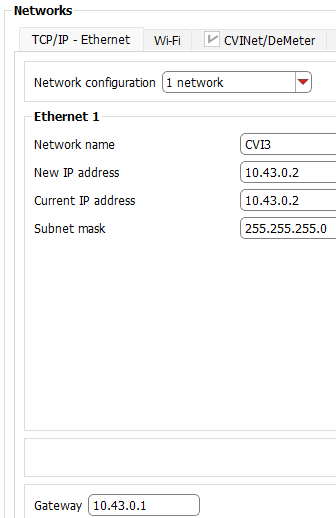
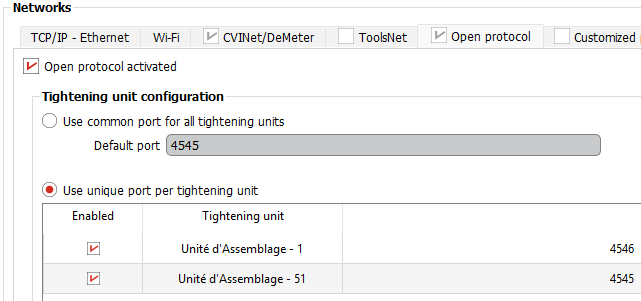

In this section, you will learn how to configure a tightening unit (screwdriver) on the Desoutter CVI3 controller for communication via OpenProtocol.
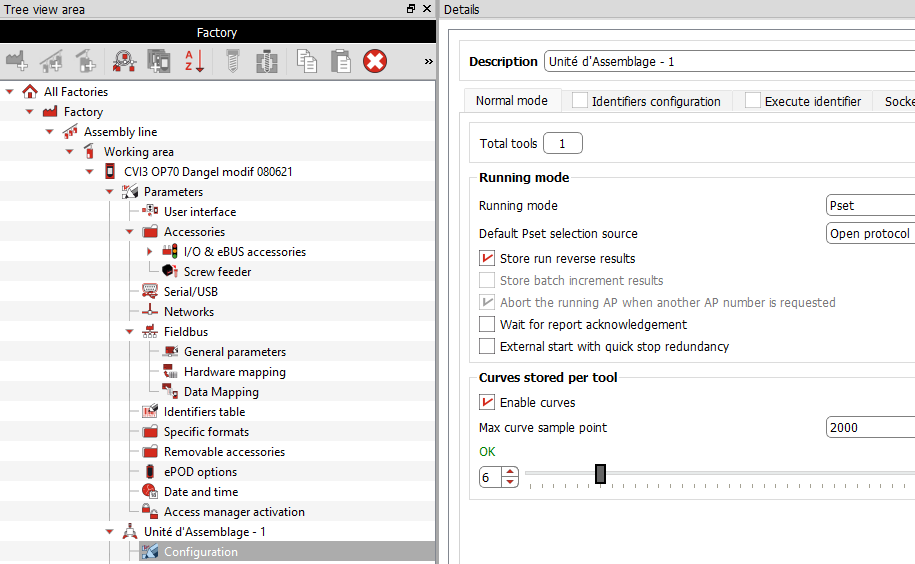
Note: The Delta Wrench should be connected directly to the SWA's Wi-Fi rather than the CVI3 controller, and compatibility is not guaranteed.
As soon as the Desoutter controller connects to the ELAM OpenProtocol Controller, all connected spindles or wireless screwdrivers are created as tools in ELAM Administration on the Tools page. The ELAM OpenProtocol Controller automatically creates the tools with the correct tool serial number from the manufacturer. The serial numbers of the tools are legibly printed on the labels.
Note: If any screwdrivers are not created automatically, check if all settings were saved and switch the controller off and on again. The ELAM OpenProtocol Controller searches for new tools every 15 seconds.

